Shopify
For platform OAuth setup, use Authenticate. Daspire manages the application credentials and stores the authorization securely; the setup form retains the connector’s current business settings.
This page contains the setup guide and reference information for Shopify.
Prerequisites
- Your Shopify store name
- Your Shopify login details or API password
Features
| Feature | Supported? |
|---|---|
| Full Refresh Sync | Yes |
| Incremental - Append Sync | Yes |
| Namespaces | No |
The Shopify source supports both Full Refresh and Incremental syncs. You can choose to copy only the new or updated data, or all rows in the tables and columns you set up for replication, every time a sync is run.
Daspire can sync data for the Shopify API.
Setup guide
Using API password to set up
-
Go to https://admin.shopify.com/store/YOURSTORE, click Settings from the side menu.
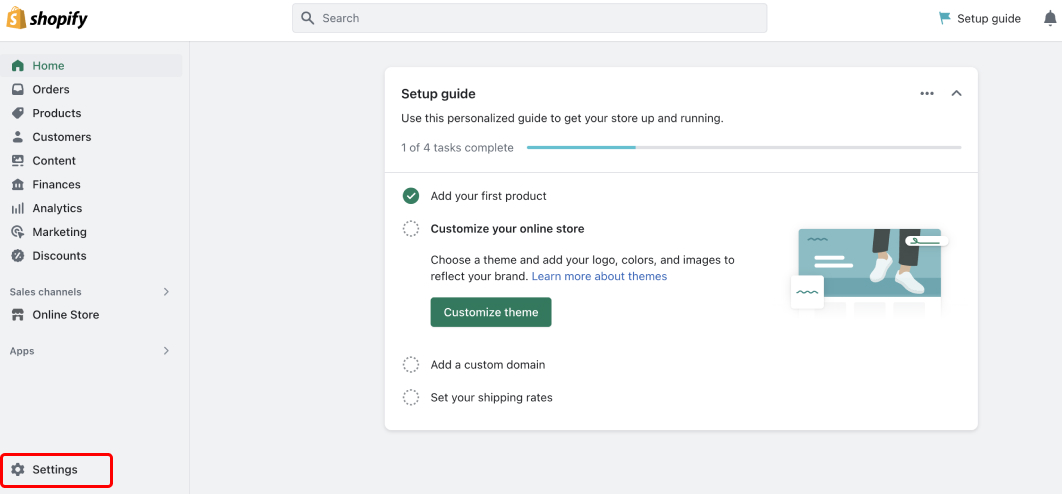
-
Click Apps and sales channels from the side menu. Then click Develop apps.
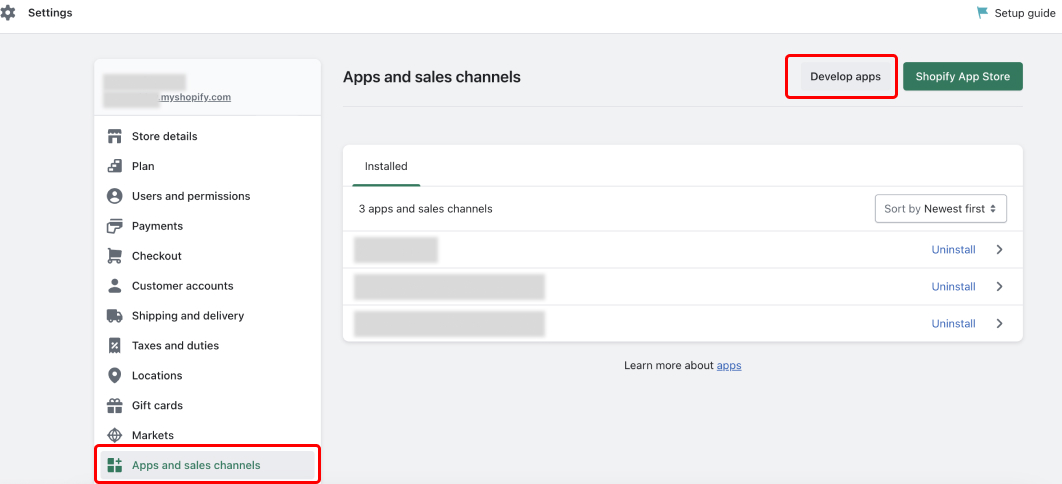
-
Click Create an app to create a private application.
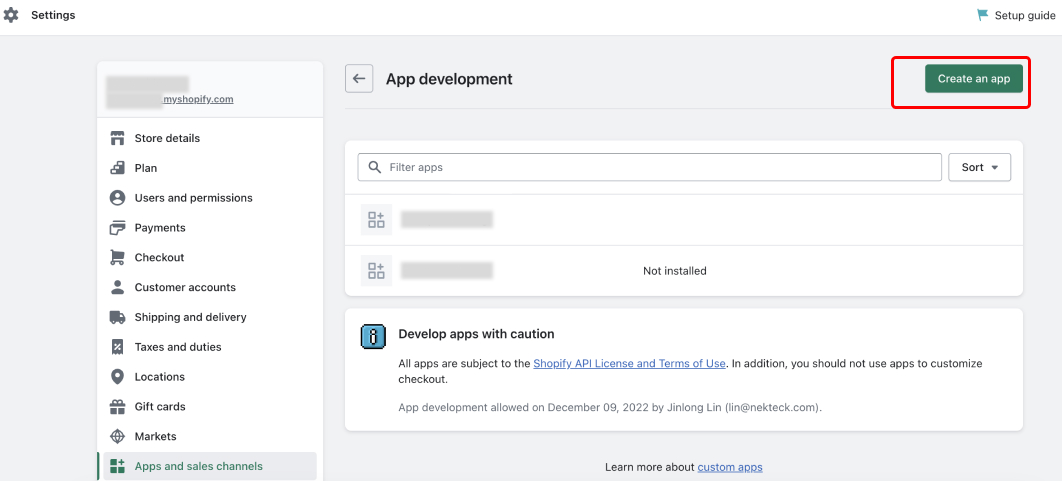
-
Enter your App name and select the appropriate App developer.
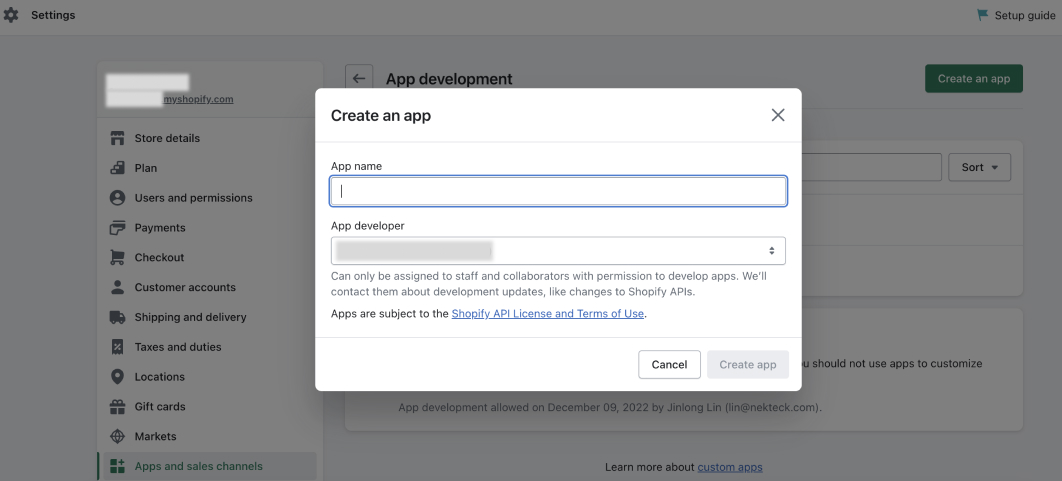
-
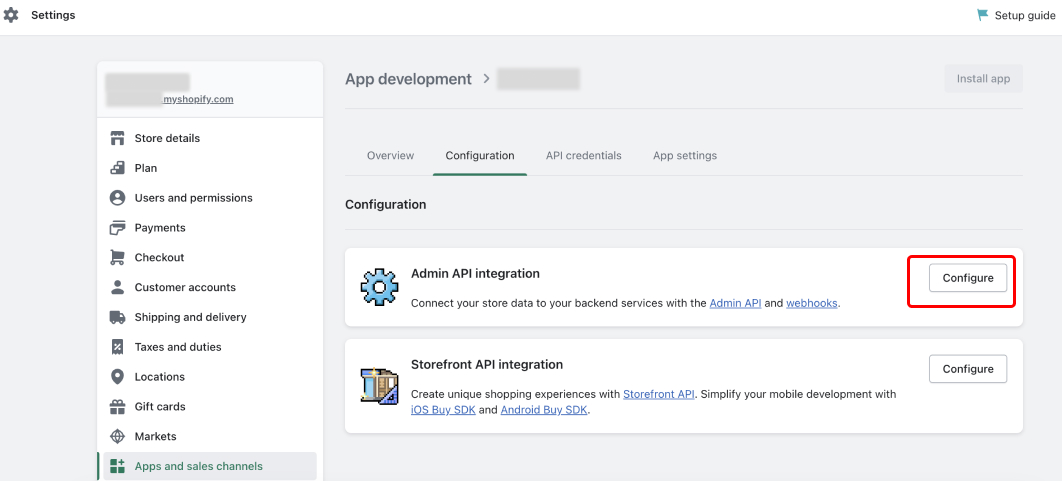
Open the App you just created, click Configuration. Then click Configure in Admin API integration.
-
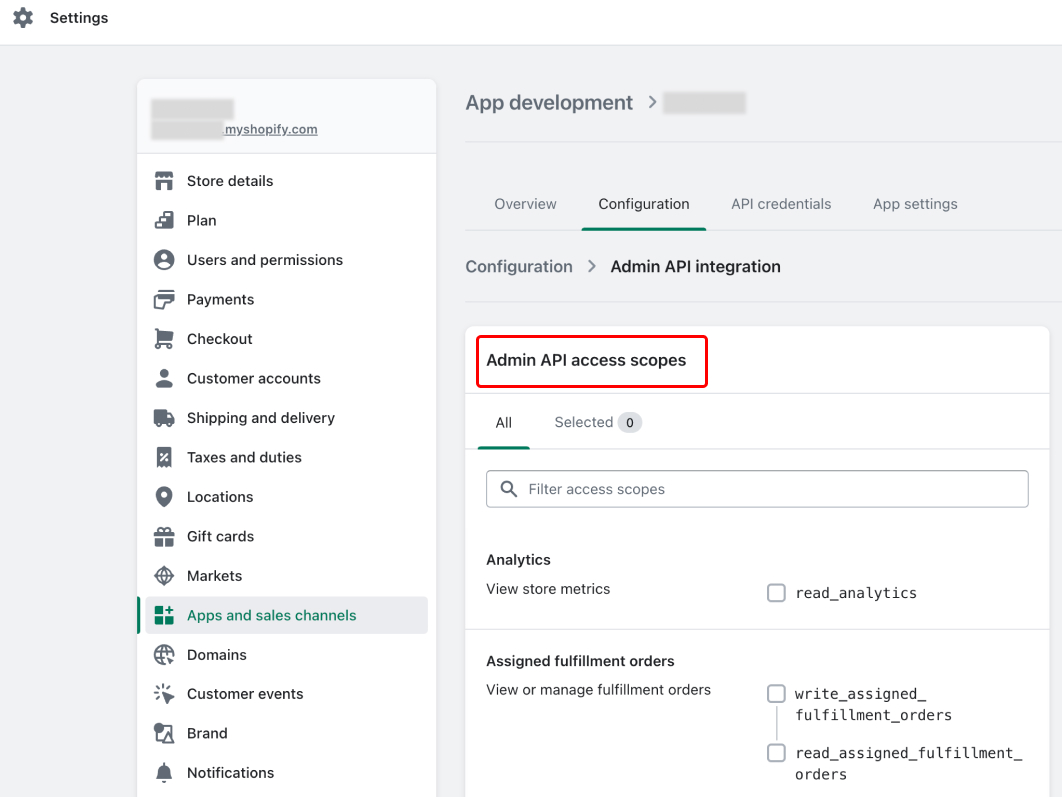
In Admin API access scopes, select the resources you want to allow access to. Daspire only needs read-level access. Once you're done, click Save.
Note: The UI will show all possible data sources and will show errors when syncing if it doesn't have permissions to access a resource.
-
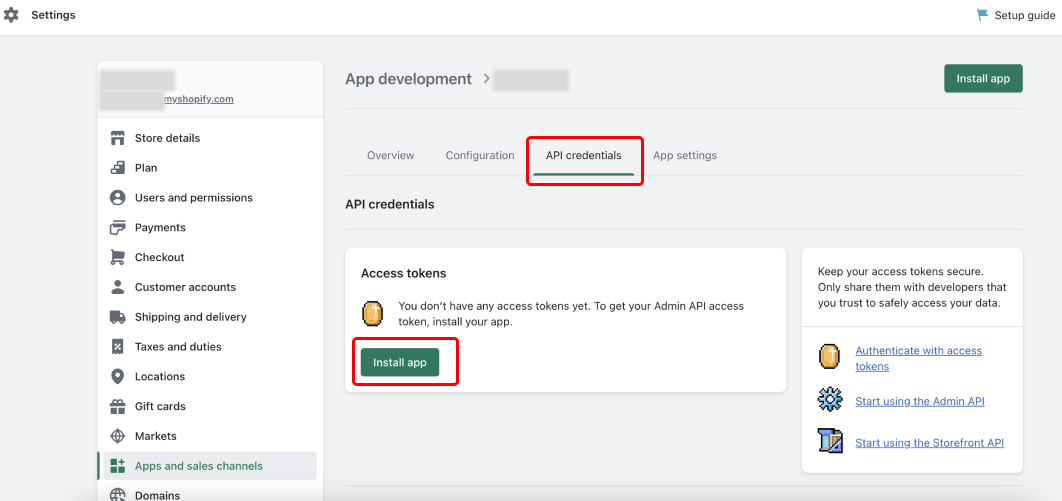
Once you have assigned the APP relevant access scope, click the API credentials tab, and then click Install app.
-
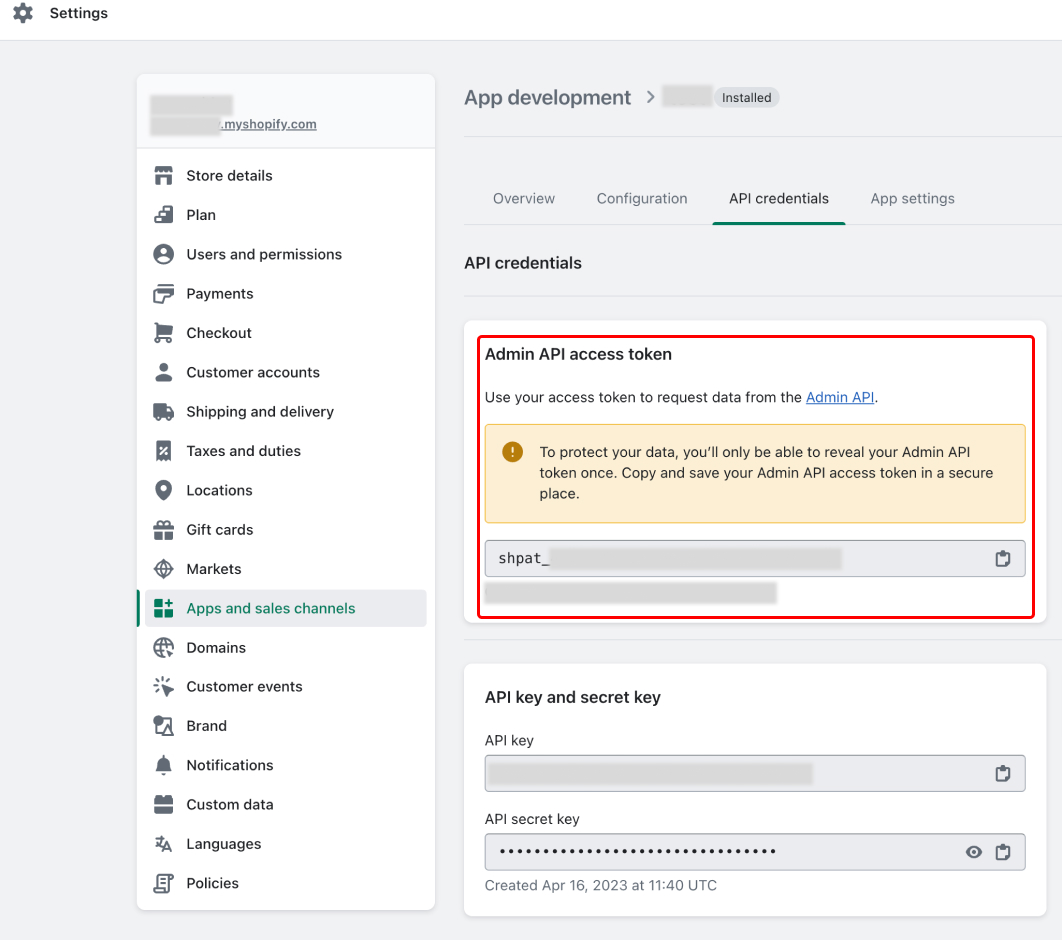
Once the app is installed, your Admin API access token will show, copy it. Your API access token starts with shpat_. You'll use as the api_password for the integration
-
You're ready to set up Shopify in Daspire!
Set up Shopify in Daspire
-
Select Shopify from the Source list.
-
Enter a Source Name.
-
Enter your Shopify Store Name.
-
Using OAuth 2.0, Authenticate your Shopify account or using API password, enter your API password.
-
Enter Replication Start Date - the date you would like to replicate data from.
-
Click Save & Test.
Output schema
The source keeps the existing core streams and adds an opt-in GraphQL expansion. Shopify scopes determine which expanded streams appear during discovery; a missing scope hides only the affected streams. If a previously selected expanded stream is no longer authorized or available, the sync fails clearly instead of silently omitting that stream. Daspire also probes store capabilities before exposing B2B, catalog, price-list, and gift-card streams.
| Area | Streams |
|---|---|
| Store and sales | shop, products, customers, orders, transactions, tender_transactions, order_refunds, order_risks, draft_orders, abandoned_checkouts |
| Fulfillment | fulfillments, fulfillment_orders, fulfillment_events |
| Discounts and content | price_rules, discount_codes, pages |
| Collections | custom_collections, collects, collections, collection_products |
| Product and inventory | product_variants, product_media, inventory_items, inventory_levels |
| Custom data | metafields (shop), product_metafields, variant_metafields, order_metafields, customer_metafields, collection_metafields, metaobjects |
| Shopify Payments | balance_transactions, payouts, disputes |
| Returns | returns, return_line_items, reverse_fulfillments |
| Markets and catalogs | markets, catalogs, publications, price_lists |
| Gift cards | gift_cards, gift_card_transactions |
| B2B | companies, company_locations |
Expanded streams use the GraphQL Admin API and Bulk Operations. Bulk result files are processed as JSONL and can resume from the stored operation ID and record offset. A production read drains every selected stream in bounded batches; the batch size limits memory use, not the total records or streams copied by the job.
Directly filterable expanded streams support incremental sync: inventory_items, product_variants, collections, balance_transactions, companies, and company_locations. Nested, partitioned, capability-shaped, or lifecycle-mutable streams use full refresh so a child timestamp, one partition, or an immutable creation date cannot silently hide later changes: inventory_levels, product_media, collection_products, the five owner-metafield streams, metaobjects, payouts, disputes, returns, return_line_items, reverse_fulfillments, fulfillment_events, markets, catalogs, publications, price_lists, gift_cards, and gift_card_transactions.
Production routing recognizes all 46 streams in the 0.1.0 connector. Existing sources remain compatible because GraphQL discovery is still opt-in per source; only enable the expansion after the source token has the required scopes and the selected catalog is ready to use the added streams.
Access scopes for expanded streams
| Streams | Required read scopes |
|---|---|
| Inventory | read_inventory |
| Product, media, collections, catalogs, and price lists | read_products; variants also use read_inventory; catalogs also require read_publications because the stream includes publication links |
| Owner metafields | The read scope for the owner resource: read_products, read_orders, or read_customers |
| Metaobjects | read_metaobjects; configure the metaobject types to replicate |
| Shopify Payments | read_shopify_payments_accounts, read_shopify_payments_payouts, and/or read_shopify_payments_disputes, depending on the selected stream; dispute order links also use read_orders |
| Returns | read_orders and read_returns |
| Fulfillment events | read_orders plus the three scopes available to a standard app: read_assigned_fulfillment_orders, read_merchant_managed_fulfillment_orders, and read_third_party_fulfillment_orders. The stream is hidden or fails closed unless all three are granted. Marketplace-channel-only fulfillment orders are not included because that separate scope requires a marketplace-channel app approval. |
| Markets and publications | read_markets and read_publications; publication catalog links also require read_products or read_product_listings |
| Gift cards | read_gift_cards; card customer/order links use read_customers and read_orders, and transaction history also requires read_gift_card_transactions (Shopify approval may be required) |
| B2B | read_companies or read_customers; the store must have B2B access, which discovery verifies with a capability probe |
Existing OAuth connections do not gain newly requested scopes automatically. Enable GraphQL and Bulk streams before starting OAuth so Daspire requests the standard expansion scopes, then re-authenticate the source before selecting expanded streams. Legacy OAuth continues to request only the original scopes while the expansion is disabled. For gift cards or the dedicated company scope, select the approved entries under Optional restricted read scopes before starting OAuth. API-password/custom-app connections must add the corresponding read scopes and reinstall or update the app token.
For the original REST incremental child streams, keep their parent streams selected when practical. In particular, sync refunds, risks, and transactions with orders, and sync discount codes with price_rules.
Data type mapping
| Integration Type | Daspire Type |
|---|---|
string | string |
number | number |
array | array |
object | object |
boolean | boolean |
Performance considerations
Shopify has some rate limit restrictions. Typically, there should not be issues with throttling or exceeding the rate limits but in some edge cases, user can receive the warning message as follows:
Caught retryable error '<some_error> or null' after <some_number> tries. Waiting <some_number> seconds then retrying..."
This is expected when the source hits the 429 - Rate Limit Exceeded HTTP Error. With the given error message, the sync operation still goes on, but will require more time to finish.
Troubleshooting
Max number of tables that can be synced at a time is 6,000. We advise you to adjust your settings if it fails to fetch schema due to max number of tables reached.